
Show Clients Grout Options Before the Job Starts
The client wants white grout. They think it will be unifying. How do you talk them out of it?
It’s a conversation every contractor has had. White grout seems safe to a client. Neutral, clean, a non-decision. What the client doesn’t realize is that white grout doesn’t unify anything. It fractures. Every grout line becomes a visible element, and it does this on any tile that isn’t the same shade of white. Colorful tile, neutral tile, dark tile: white grout draws a grid over all of it. If the client doesn’t listen, the end result is usually grout shock: that moment after installation when a client sees a finished floor and realizes the grout they chose has completely changed the tile design. While you might see this coming, trying to explain while they stare at a swatch card is an uphill battle.
The Groutr app exists to make this conversation easier. Groutr lets you recolor grout lines in about a minute, on a photo of your client’s actual tile.
The problem with grout samples
A sample stick is useful but it doesn’t tell a client anything about how their floor will read when it’s grouted wall to wall. Grout color behaves differently at scale. White grout that looks crisp and minimal on a stick turns into a grid across 80 square feet of tile. A warm gray that looks bland as a sample might be exactly right once you see it on the actual pattern.
Clients can’t make this mental leap. Asking them to extrapolate from a swatch to a full installation is asking them to do something genuinely difficult. When they get it wrong they remember that you were the one who recommended it.
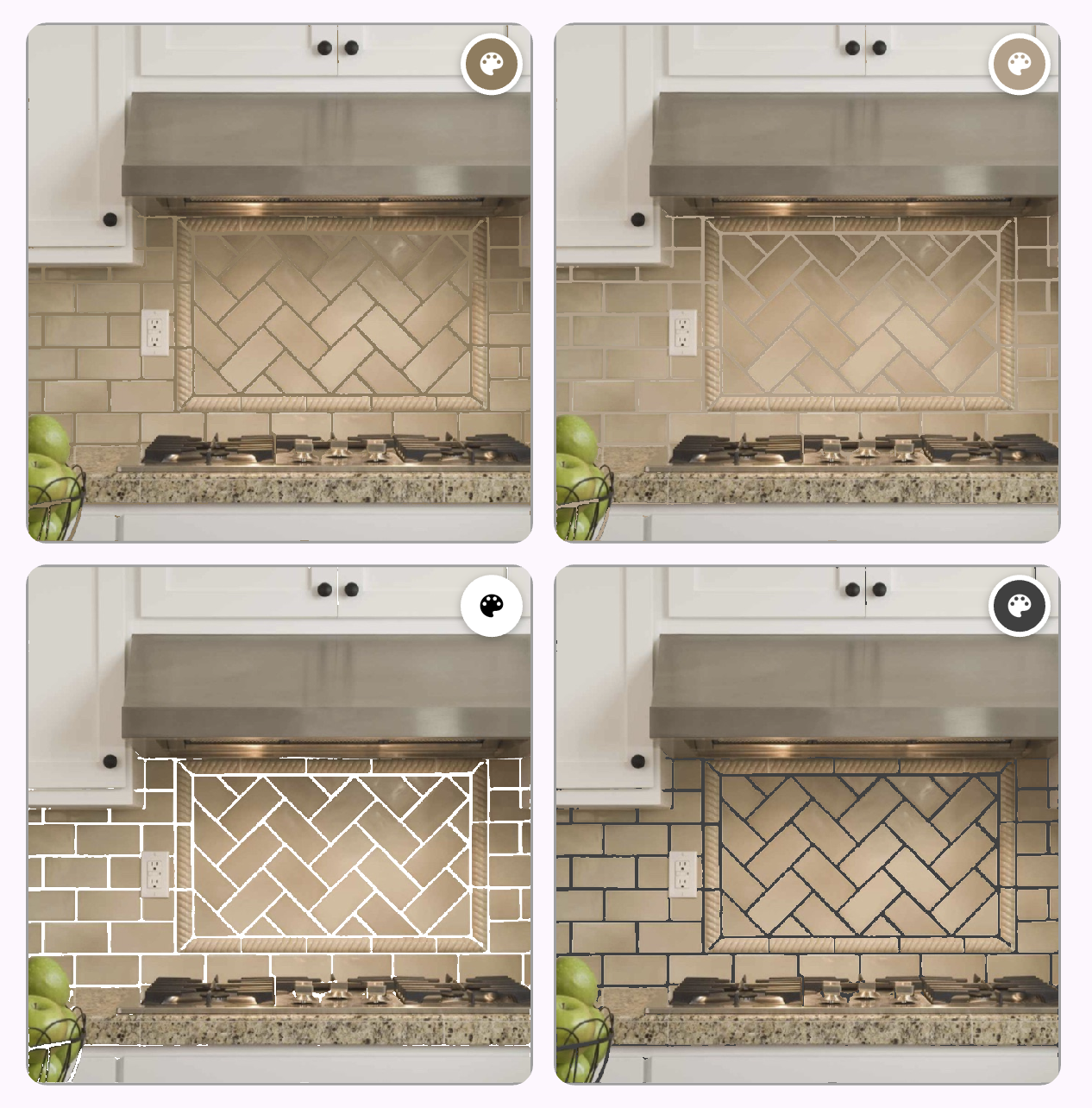
The same tile, four grout options, one image. Something a client can actually react to.
A better workflow
Groutr can help. If you have physical grout sample sticks or swatches, hold them in the frame when you take a picture of the installed tile. That way the lighting on the samples matches the lighting on the tile, which gives you the most accurate color reference possible. Then use the from-image color picker in the Groutr app to sample directly from the sticks in your photo. The app also has other options for choosing color, including custom colors or a catalog of brand-name colors, but picking a swatch color from the image is the closest thing to ground truth short of actually grouting.
The whole process takes a minute or two. Export the image, choose a few colors to compare side by side in the grid view, show it to the client, and let them point at the one they want. No ambiguity, no surprises on install day.
Why this is worth adding to your process
A client who approved a visual before the job started is a client who owns the decision. If they later decide they wish they’d gone darker, they have a reference point that shows they saw the options and chose. That’s a meaningful shift in how disputes get resolved.
It also positions you differently from contractors who hand over a swatch fan and say “pick one.” Showing a client a rendered preview of their actual tile with their actual grout options is a level of service most of them have never experienced. It tends to get mentioned in reviews.
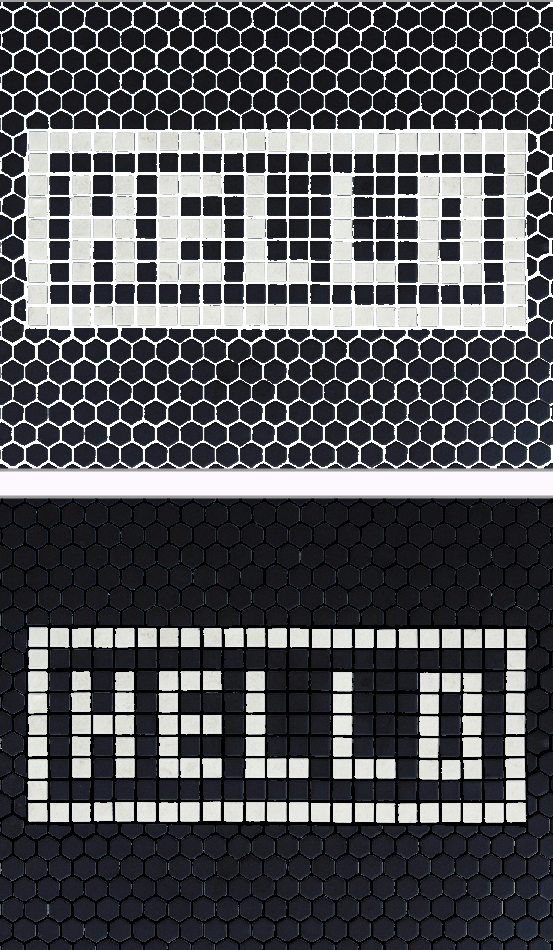
The same tile with white and black grout. The kind of visual that makes a client reconsider “just use white.”
What it costs
Groutr is free to try on iOS and Android and includes a few default colors. The full color catalog (including custom colors) is available with a day pass or a low cost yearly subscription. You can find it at groutr.app or search Groutr in the App Store or Google Play.
Groutr is an independent app built for anyone working with grouted tile. It is not affiliated with any grout manufacturer.
As an Amazon Associate and participant in other affiliate programs, this post may contain affiliate links. I earn a small percentage from qualifying purchases via these links.