Why AI Can't Visualize Grout Color (And What Actually Works)
You’ve got a grout color decision to make. Someone suggests asking ChatGPT to visualize it. Sounds reasonable. AI can do everything now, right?
Here’s the problem: it can’t do this. Not accurately. And if you’ve already tried it, you’ve probably noticed something felt off about the result.
What AI image tools actually do
When you ask ChatGPT, Midjourney, or any other generative AI to “change the grout color to dark gray,” it doesn’t analyze your grout lines and recolor them. It generates an entirely new image from your request. That’s a fundamentally different operation with subtle but important consequences.
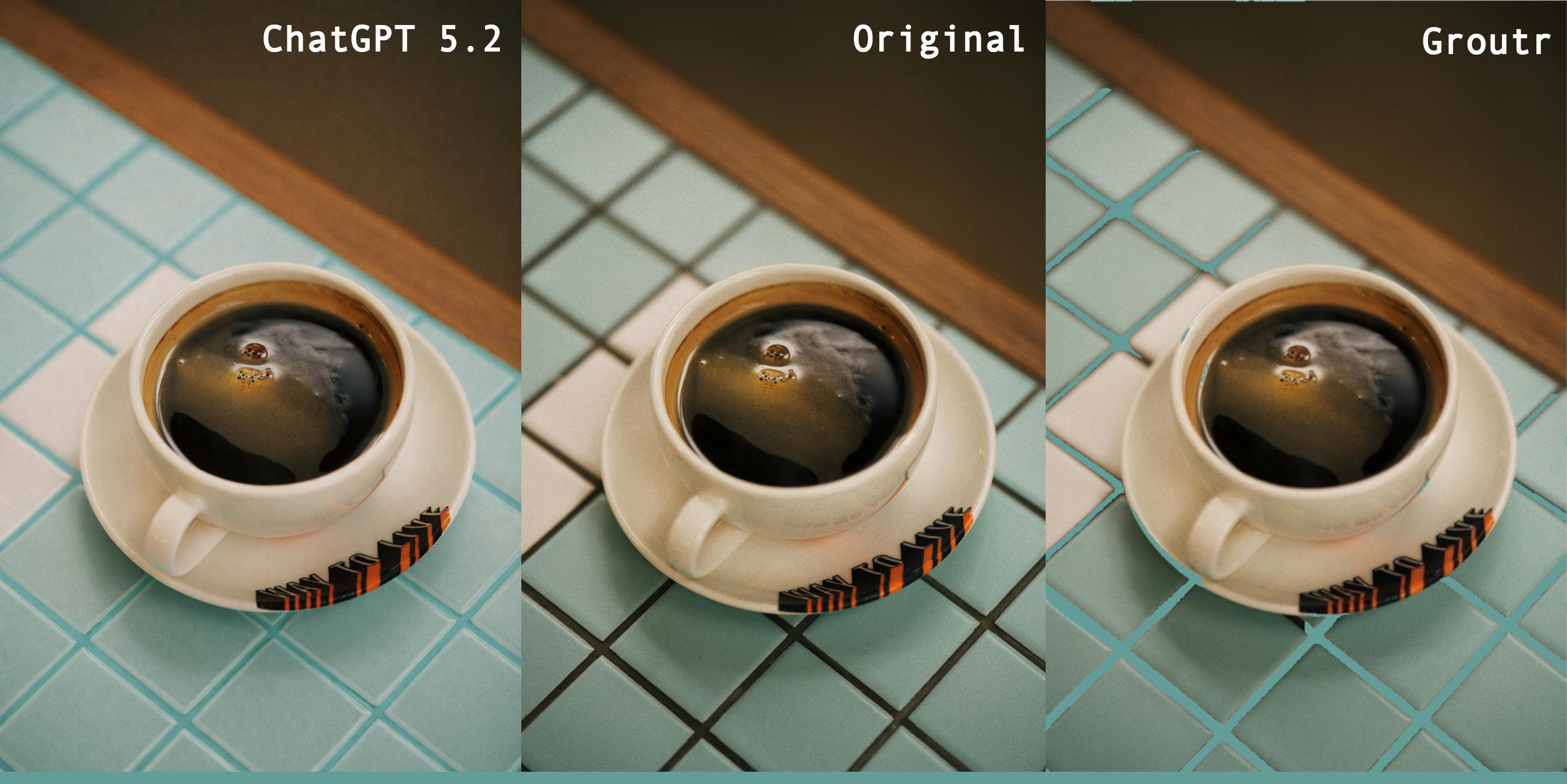
The results from generative AI usually look polished, but aren’t true to your tiles: tiles get recolored along with the grout, shapes and textures shift, and the final image—however attractive—no longer represents your actual tile. This can lead to disaster if your actual tile clashes with the grout color you asked for.
Left: ChatGPT 5.2 asked to change the grout color to cyan. Right: Groutr applied to the same photo. The AI recolored the tiles along with the grout; Groutr changed only the grout lines.
This isn’t a flaw in a specific model, and it’s not something better AI will eventually fix. It’s a structural mismatch between what generative image AI does (whole-image generation based on learned patterns) and what you actually need: surgical recoloring of a specific region, and only that region, of your photo.
Why grout lines are hard
Grout lines are narrow, often just a few pixels wide in a photo. They vary in width, follow irregular paths in mosaic work, and are visually similar to grout shadow and tile edge detail. Even at their most obvious, they’re a small fraction of the image.
A generative model has no reason to treat grout lines as a distinct, selectable region. It sees a tile floor the same way it sees anything else: a pattern of colors and textures to be reproduced or modified wholesale.
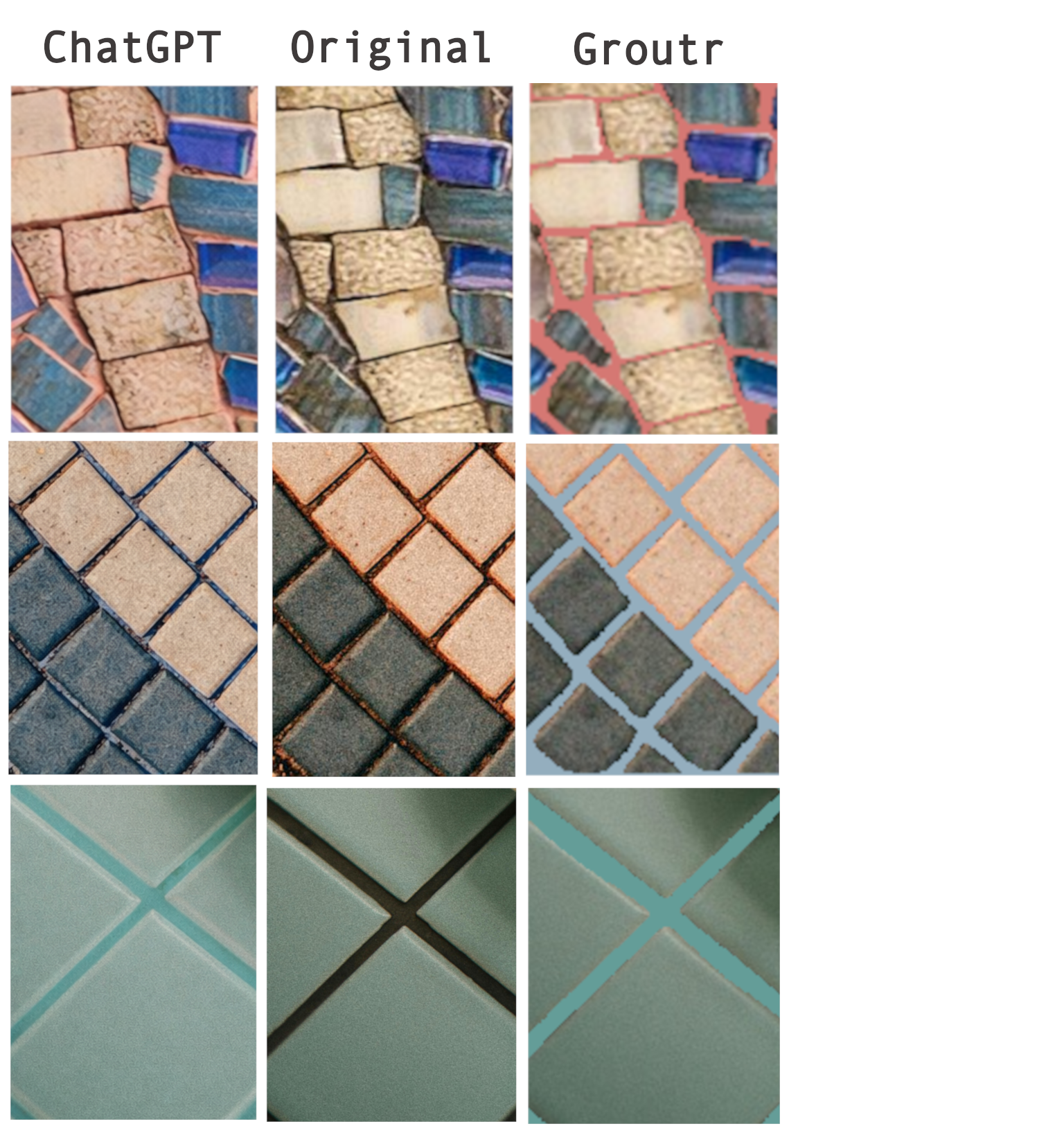
On complex mosaic tile, the breakdown is even more dramatic. ChatGPT recolored the tiles themselves and altered the design. Groutr left the tile untouched.
What an overlay approach does differently
Groutr doesn’t generate a new image. It detects the grout lines in your photo using computer vision, then recolors only those detected lines using an overlay, leaving the tile surface underneath completely untouched.
The tile texture, color variation, reflections, and shadows all remain exactly as they are in your original photo. What changes is only the grout.
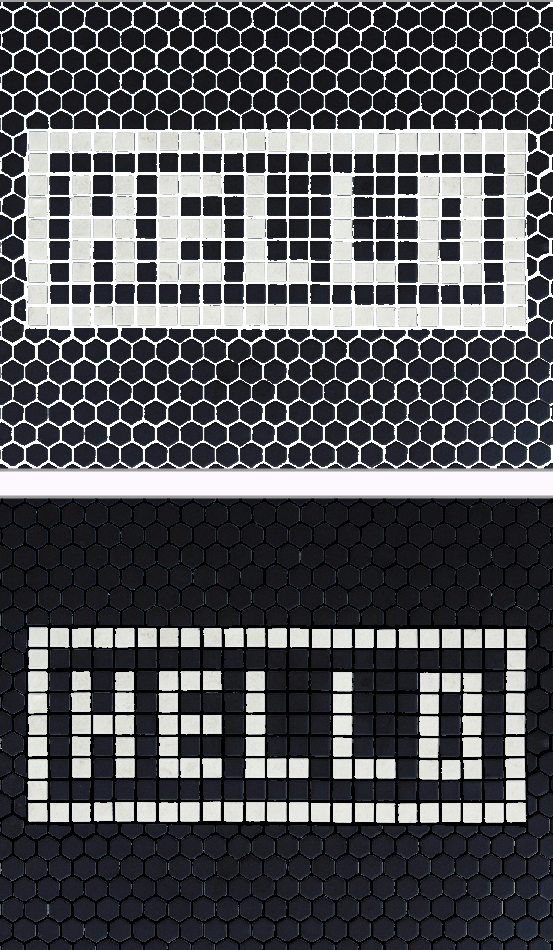
The same hex tile with white grout (top) and black grout (bottom). The tile surface is pixel-for-pixel identical. Only the grout lines changed.
The practical difference: you’re seeing how your actual tile looks with a different grout color. Not a plausible approximation. Not a generated version that happens to look similar. Your tile, your lighting, your photo, with the grout recolored precisely.
When does this matter?
If you’re choosing grout color before installation, the difference between accurate and approximate is the difference between confidence and a guess. Grout color has an outsized effect on how tile reads. It can make the same tile look modern or traditional, busy or calm, large-format or fine. Getting it wrong means living with it.
There’s also a precision gap: AI tools don’t let you specify an exact color. Groutr accepts hex codes, lets you pick directly from an image, and includes name-brand grout color options—so what you preview is what you can actually order.
AI tools give you a direction. Groutr gives you a preview you can actually trust.
Try it on your own photo at groutr.app.
Comparison images generated using ChatGPT 5.2 and Groutr on the same source photos. Grout color in each Groutr preview was matched to whatever color ChatGPT generated, since ChatGPT doesn’t support exact color specification.
As an Amazon Associate and participant in other affiliate programs, this post may contain affiliate links. I earn a small percentage from qualifying purchases via these links.